
IPS vs VA vs TN vs OLED: Which Monitor Panel Is Best for Gaming?
Every gaming monitor listing has the same confusing line somewhere in the specs: IPS, VA, TN or OLED. Sellers mention it like you should already know what it means. Most people don’t, and that’s how they end up with a monitor that looks washed out, smears in dark scenes or burns the taskbar into the screen.
The panel type decides how your monitor looks and feels more than almost anything else. Here’s what each one is good at, what it’s bad at, and which one fits how you play.
The Quick Answer
| Panel | Best For | Biggest Weakness |
| IPS | Most gamers, great all-rounder | Gray-looking blacks in dark rooms |
| VA | Deep blacks on a budget, dark games | Smearing in fast dark scenes |
| TN | Cheapest high refresh rates | Poor colors and viewing angles |
| OLED | Best picture quality and fastest response | Price and burn-in risk |
If you’re not sure, buy a good IPS monitor. If money isn’t tight and you mostly play story games, OLED is the most impressive. If you play competitive shooters on a tight budget, a fast IPS is usually a better choice than TN now.
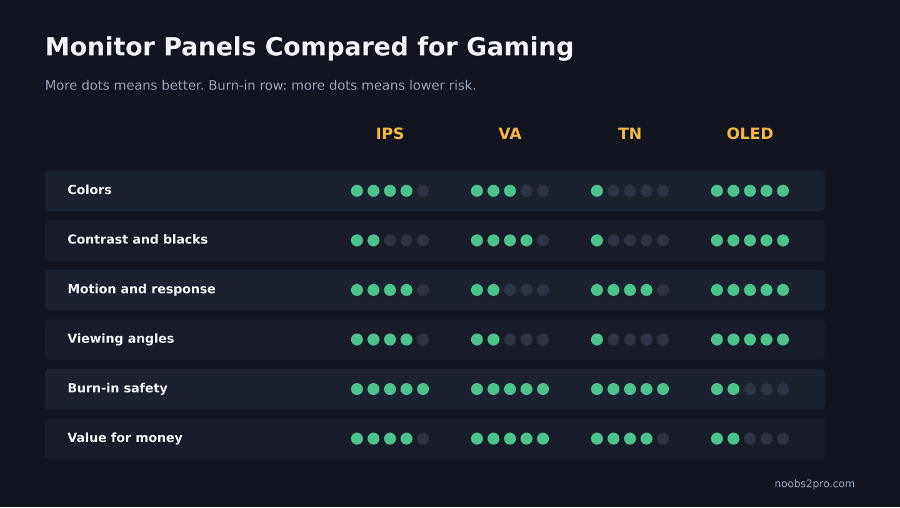
How IPS, VA, TN and OLED panels compare for gaming (file: monitor-panel-types-compared.png)
IPS: The All-Rounder
IPS panels are the most popular choice for gaming monitors, and for good reason.
Good at:
- Accurate, vibrant colors
- Wide viewing angles, so colors don’t shift when you move your head
- Fast response times on modern gaming models
- High refresh rates, like 144Hz, 165Hz and 240Hz
Not so good at:
- Contrast. Blacks look slightly gray, especially in a dark room.
- IPS glow. A faint glow in the corners on dark screens. It’s normal, and some panels have more than others.
Best for: Almost everyone. Competitive games, story games, YouTube, work and editing.
VA: Deep Blacks for Less Money
VA panels sit between IPS and TN, with one big strength: contrast.
Good at:
- Much deeper blacks than IPS, often around three times the contrast
- Great for dark games, movies and night scenes
- Curved gaming monitors are often VA
Not so good at:
- Black smearing. In fast-moving dark scenes, dark pixels change slowly and leave a smeary trail. Some players don’t notice. Others can’t unsee it.
- Viewing angles are worse than IPS.
Best for: Single-player and atmospheric games, movies, and players who game in dark rooms.
TN: Fast and Cheap, But Dated
TN used to be the default for competitive gamers because it was the fastest.
Good at:
- Fast response times
- Usually the cheapest way to get a high refresh rate
Not so good at:
- Washed-out colors
- Poor viewing angles. Look from slightly above or below and colors change.
- Weak contrast
Best for: Very tight budgets focused only on competitive shooters. Fast IPS panels have mostly caught up, so TN is harder to recommend now.
OLED: The Best Picture, With a Catch
OLED is different from the others. Each pixel makes its own light, so it can turn off completely for perfect black.
Good at:
- Perfect blacks and effectively unlimited contrast
- Extremely fast response time, so motion looks very clear
- Stunning HDR
- Vibrant colors
Not so good at:
- Price. OLED gaming monitors cost much more than IPS or VA.
- Burn-in risk. Static images left on screen for very long periods, like taskbars, HUDs or chat windows, can leave faint permanent marks over time. Modern OLED monitors have features to reduce this, and many brands offer burn-in warranties.
- Lower full-screen brightness than some LCD monitors, which matters in bright rooms.
You’ll also see QD-OLED and WOLED. They’re two types of OLED technology made by different manufacturers. Both are excellent, with small differences in brightness and color.
Best for: Players who want the best possible picture and can afford it, especially for story games and HDR.
Side-by-Side Comparison
| IPS | VA | TN | OLED | |
| Colors | Very good | Good | Weak | Excellent |
| Contrast and blacks | Average | Very good | Weak | Perfect |
| Response time | Fast | Slower in dark scenes | Fast | Fastest |
| Viewing angles | Very good | Average | Poor | Excellent |
| Burn-in risk | No | No | No | Yes, over long use |
| Price | Medium | Low to medium | Low | High |
Which Panel for Which Gamer?
| You Mostly Play | Best Pick |
| CS2, Valorant and other competitive shooters | Fast IPS at 144Hz to 240Hz, or OLED if budget allows |
| Story games and open worlds | OLED, or VA for budget contrast |
| A mix of everything | IPS |
| Games plus video editing or design | IPS |
| Very tight budget | Budget IPS, or VA for darker games |
Other Specs That Matter Just as Much
The panel type isn’t everything. Check these too:
- Refresh rate: 144Hz or higher for gaming. Make sure it’s actually set correctly. Here’s how to check your monitor is running at 144Hz.
- Adaptive sync: G-Sync or FreeSync support removes screen tearing. Our V-Sync vs G-Sync vs FreeSync guideexplains how to set it up.
- Resolution: 1080p for high FPS on mid-range PCs, 1440p if your graphics card can handle it.
- Size: 24 inches suits 1080p. 27 inches suits 1440p.
FAQs
Which panel is best for gaming?
IPS is the best all-round choice. OLED gives the best picture if you can afford it. VA is great for deep blacks on a budget.
Is VA or IPS better for gaming?
IPS is better for fast games and colors. VA is better for contrast and dark scenes.
Is TN still good for gaming?
TN is fast and cheap, but its colors and viewing angles are poor. Fast IPS panels are now a better choice for most players.
Should I worry about OLED burn-in?
It’s a real risk with long-term static images, but modern OLED monitors have protection features. Varying what’s on screen and using the monitor’s care features helps a lot.
What is IPS glow?
A faint glow visible in the corners of IPS panels on dark screens. It’s normal and varies between units.
Looking at monitor brands? Check our list of the top gaming monitor brands.


