
CS2 Trade Up Contracts Explained: How They Work and When They’re Worth It
You have a pile of skins you’ll never use. Ten of them, same rarity, sitting in your inventory doing nothing. A trade up contract lets you throw them in and get one better skin out.
Sometimes that’s a great deal. Sometimes it’s a very fancy way to turn $10 of skins into $4. And since the October 2025 update, trade ups can even give you a knife or gloves, which changed the whole skin market overnight.
Here’s how trade ups actually work and how to tell a good one from a bad one.
What Is a Trade Up Contract?
A trade up contract is a built-in CS2 feature. You give up a set of skins of the same rarity, and you get back one skin from the next rarity tier.
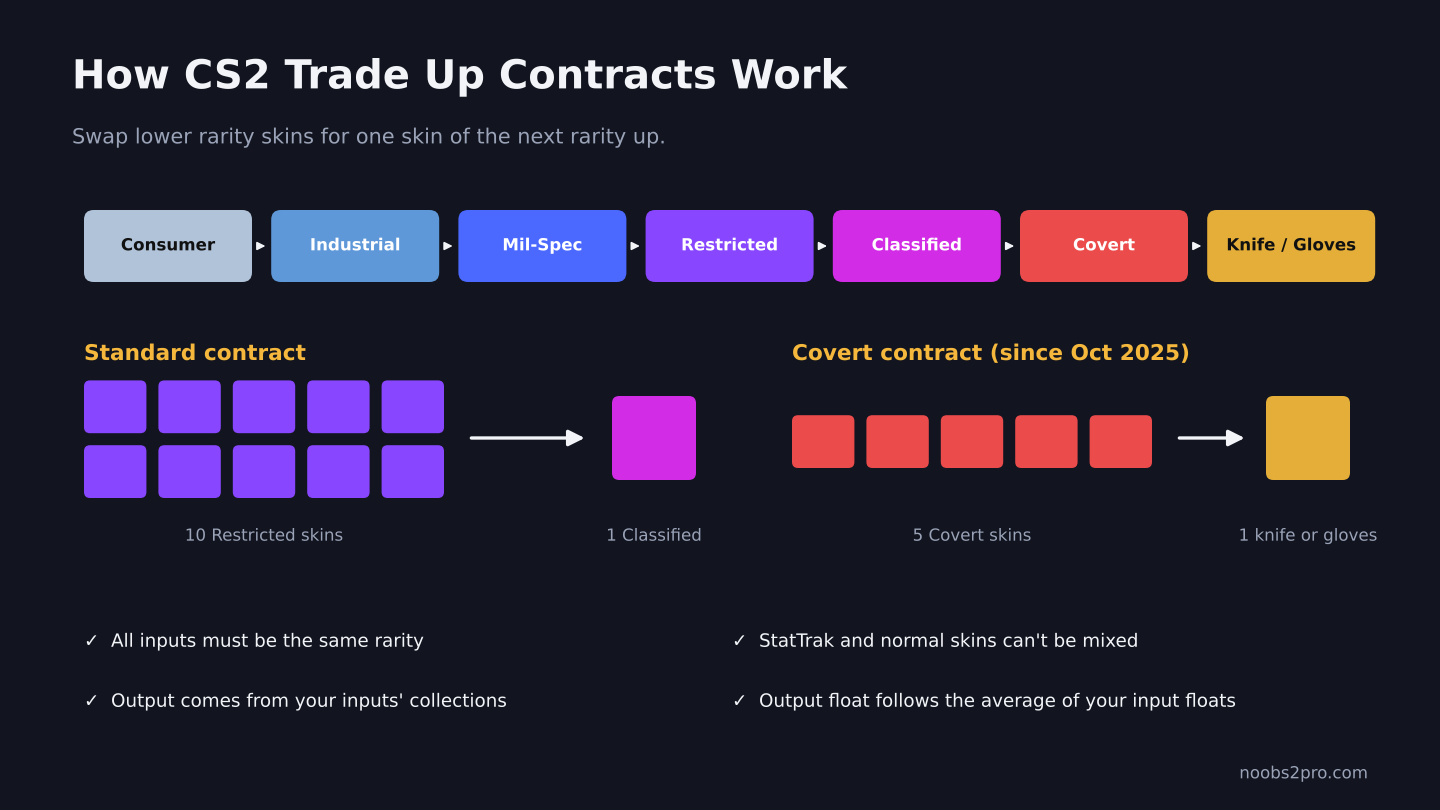
How standard and Covert trade up contracts work in CS2 (file: cs2-trade-up-contract-explained.png)
The rarity ladder goes like this:
| Rarity | Color | Trade Up Into |
| Consumer Grade | White | Industrial Grade |
| Industrial Grade | Light blue | Mil-Spec |
| Mil-Spec | Blue | Restricted |
| Restricted | Purple | Classified |
| Classified | Pink | Covert |
| Covert | Red | Knife or gloves (since October 2025) |
The Two Types of Contract
Standard contract: 10 skins of the same rarity get you 1 skin of the next rarity. This works from Consumer Grade all the way up to Covert.
Covert contract: Valve added this in the October 22, 2025 update. You put in 5 Covert skins and get back 1 knife or pair of gloves. If all 5 inputs are StatTrak, you get a StatTrak knife. Since StatTrak gloves don’t exist, a StatTrak Covert contract always gives a knife.
This update made knives much easier to get, and knife prices dropped sharply afterward. We covered what that meant for the market in our article on whether the CS2 skin market will recover.
The Rules
- All inputs must be the same rarity. No mixing Restricted with Classified.
- StatTrak and normal skins can’t be mixed. It’s all StatTrak or all normal.
- Souvenir skins can’t be used at all.
- Recently traded skins may be locked. Items you received in a trade within the last 7 days are trade protected, which means they can’t be consumed. Wait until the protection ends before using them in a contract.
- You can’t pick the exact output. The game picks from a pool based on your inputs.
How the Output Is Chosen
This is the part that decides whether a trade up is smart or a donation.
Every skin belongs to a collection. When you do a trade up, the result comes from the next-rarity skins in the same collections as your inputs. The more inputs you use from one collection, the more likely your output comes from that collection.
Here’s a simple example. Say you put in 10 Restricted skins:
| Inputs | Possible Outputs | Your Odds |
| 10 skins from Collection A | Collection A has 2 Classified skins | 50% each |
| 5 from A, 5 from B | A has 2 Classified, B has 1 | A: 25% each, B: 50% |
| 9 from A, 1 from B | A has 2 Classified, B has 1 | A: 45% each, B: 10% |
That’s why smart traders often use mostly cheap “filler” skins from a collection with only one good output. It pushes the odds toward the skin they actually want.
For Covert contracts, the knife or gloves come from the special item pool of your inputs’ cases. Five Coverts from the same case lock the result to that case’s knives or gloves.
How the Output Float Works
The float of the skin you get is based on the average float of your inputs, adjusted to fit the output skin’s own float range.
In plain terms: low float inputs give you a low float output. If you want a Factory New result, you need clean inputs. If you throw in Battle-Scarred junk, expect a Battle-Scarred reward.
The exact math gets fiddly, especially for skins with float caps, so use a trade up calculator to check the result before you sign. If floats are new to you, read our guide on CS2 float values first.
How to Do a Trade Up in CS2
- Open your inventory in CS2.
- Select Trade Up Contract.
- Add your skins. The game only shows skins that are allowed in the contract.
- Check the list of possible outcomes the game shows you.
- Confirm and sign the contract.
Once you sign, there’s no undo. Double check everything first.
Is a Trade Up Worth It?
Do the math before you do the contract. Add up what your inputs are worth on the market, then compare it against what each possible output is worth and how likely you are to get it.
| Situation | Usually Worth It? |
| You have leftover skins you’d never sell for much | Often yes |
| Inputs bought at market price, hoping to profit | Usually no, most popular contracts are already priced in |
| Chasing one specific skin with good odds | Sometimes, if the math checks out |
| Chasing a knife with 5 Coverts | Only if you’re fine with getting the cheapest knife in the pool |
| Using a calculator first | Always |
Most profitable trade ups get found quickly and the input prices rise until the profit disappears. That’s how markets work. Treat trade ups as a way to clean up your inventory or chase a skin you like, not as a guaranteed money maker.
Trade Ups and the Dead Hand Gloves
The Dead Hand Collection, added in March 2026, includes 22 gloves. Gloves drop very rarely from the Dead Hand Terminal, so many players use Covert trade ups with Dead Hand Coverts instead. It’s still a gamble, since you can’t choose which pair of gloves you get, but the odds are far better than waiting for a lucky drop.
FAQs
How many skins do you need for a trade up in CS2?
Ten skins of the same rarity for a standard contract. Five Covert skins for a knife or gloves contract.
Can you trade up into a knife in CS2?
Yes. Since the October 2025 update, 5 Covert skins can be traded up into a knife or gloves.
Can you mix StatTrak and normal skins in a trade up?
No. All inputs must be StatTrak or all must be normal.
Can Souvenir skins be used in trade ups?
No.
Are CS2 trade ups profitable?
Sometimes, but rarely by accident. Use a trade up calculator and compare real market prices before signing.
Getting skins to trade up is easier when you collect your weekly drops. Our guide on how to earn money in CS2 using weekly drops shows how to stack them up.