
Gaming on a Mac in 2026: What Actually Works
You’ve got a MacBook for college or work. It’s fast, the battery lasts forever and it handles everything you throw at it. Then your friends say, “Let’s play tonight,” and you realize you have no idea what your Mac can actually run.
Mac gaming has improved a lot. Apple Silicon chips are powerful, more big games come to Mac natively, and cloud gaming fills many of the gaps. But some popular games still don’t work at all. Here’s the honest picture.
The Quick Answer
| Want to Play | Does It Work on Mac? |
| Many big single-player games | Often yes, natively or through translation tools |
| Strategy, indie and older games | Usually yes |
| CS2 | No native Mac version |
| Valorant | No native Mac version, blocked in translation tools |
| Fortnite, Apex, PUBG, Call of Duty | Not natively, cloud gaming is the best option |
| Almost anything you own on Steam or Epic | Possible through cloud gaming |
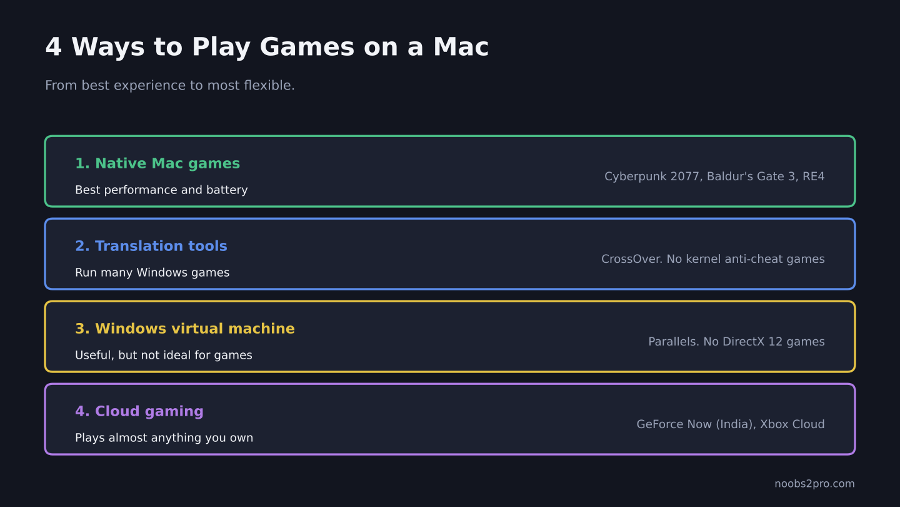
The four main ways to play games on a Mac and what each is good for (file: mac-gaming-options.png)
Option 1: Native Mac Games
These are games built to run on macOS. They’re the best experience: no extra software, good performance and full battery efficiency.
Big games with native Mac versions include Cyberpunk 2077, Baldur’s Gate 3, Resident Evil 4, Death Stranding Director’s Cut, Control and Assassin’s Creed Shadows, along with strategy favorites like Civilization VII, Stellaris and Crusader Kings III.
Where to find them:
- Steam: Filter the store by macOS to see games that run natively.
- Mac App Store: More big releases now launch here too.
- Apple Arcade: A subscription with ad-free games for Mac, iPhone and iPad.
- Battle.net: World of Warcraft runs natively on Mac.
Option 2: Translation Tools (Run Windows Games)
These tools let many Windows games run on Apple Silicon Macs without installing Windows.
CrossOver is the most popular paid option. It’s built on Wine and Apple’s Game Porting Toolkit, and it runs many single-player Windows games. It costs about $74 a year, and there’s a free 14-day trial so you can test your games first.
Whisky was a popular free option, but its development ended in 2025. It may still run some games, but it won’t get updates, so a maintained tool is the better choice for new setups.
What works well: Single-player games and co-op games without strict anti-cheat.
What doesn’t work: Most online games with kernel-level anti-cheat, like Valorant, Fortnite, Call of Duty, Apex Legends and PUBG. CS2 also isn’t a safe option. Don’t risk your account trying.
Option 3: Run Windows in a Virtual Machine
Parallels Desktop runs Windows 11 inside macOS. It’s useful if you need Windows for other apps too, but it’s not the best way to game. Performance varies, it uses a lot of your Mac’s memory and storage, it can’t run DirectX 12 games, and some games detect the virtual machine and refuse to launch.
Boot Camp, which let older Intel Macs run Windows directly, isn’t available on Apple Silicon Macs.
Option 4: Cloud Gaming (The Best Workaround)
Cloud gaming runs the game on a powerful PC in a data center and streams it to your Mac. Your Mac just displays the video and sends your inputs, so even a MacBook Air can play demanding games.
GeForce Now launched in India in April 2026 with servers in Mumbai. It streams games you already own on Steam, Epic and other stores, including some that won’t run on Mac otherwise. Indian pricing at launch was ₹999 for the Performance tier and ₹1,999 for the Ultimate tier per 90-day pass. Check NVIDIA’s India page for current plans.
Xbox Cloud Gaming is included with certain Game Pass plans and streams Microsoft’s library in your browser. Our breakdown of Xbox Game Pass in India covers which plans include it.
What you need: A fast, stable internet connection, ideally wired or strong 5GHz Wi-Fi, and a controller for most games.
Which Mac Is Good for Gaming?
| Mac | Gaming Experience |
| MacBook Air (M-series) | Fine for lighter games and cloud gaming. No fan, so it can throttle in long sessions. |
| MacBook Pro (Pro or Max chip) | Much better for native AAA games and translation tools |
| Mac mini or iMac | Good for desk gaming, depends on the chip |
| 8GB memory models | Can struggle with demanding games |
| 16GB or more | Much smoother for modern games |
If you’re buying a Mac partly for gaming, more memory and a Pro chip make a big difference. If gaming is your main use, a Windows gaming laptop still gives you far more games for the money.
Tips for Better Mac Gaming
- Use a controller. Mac supports PlayStation and Xbox controllers over Bluetooth.
- Plug in your charger for long sessions.
- Lower resolution and settings on MacBook Air models to reduce heat and keep performance steady.
- Try before you buy. Use CrossOver’s free trial, Steam’s refund window or cloud gaming before paying for a game you’re not sure will run.
- Check before you download. Make sure a Windows game doesn’t use kernel-level anti-cheat before trying it in a translation tool.
FAQs
Can you play CS2 on a Mac?
Not natively. Cloud gaming is the most practical option.
Can you play Valorant on a Mac?
No. Valorant has no Mac version, and its anti-cheat blocks translation tools and virtual machines.
Is a MacBook good for gaming?
It’s good for native Mac games, lighter games and cloud gaming. For the widest choice of games, a Windows gaming laptop is better.
What is the best way to play Windows games on a Mac?
For single-player games, CrossOver. For online games with anti-cheat, cloud gaming like GeForce Now.
Does GeForce Now work in India?
Yes. It launched in India in April 2026 with servers in Mumbai.
Want to check whether a Windows PC would run a game better? Our guide on how to check if a PC can run a game explains what to look for.

