
Wired vs Wireless Gaming Mouse: Is There Still Any Input Lag?

Ask a group of gamers whether wireless mice are good for gaming and at least one person will say, “Never. Wireless has lag.” Usually with the confidence of someone who last tried one in 2012.
That used to be true. It mostly isn’t anymore. Most pro players in CS2 and Valorant now use wireless mice in tournaments, where a few milliseconds can decide a round. So something clearly changed.
Here’s the honest picture: when wireless is as good as wired, when it isn’t, and which one makes more sense for you.
The Short Answer
A good gaming wireless mouse using a 2.4GHz USB receiver performs so close to a wired mouse that you won’t feel the difference. Bluetooth is a different story. It’s fine for office work, but it’s noticeably slower and you shouldn’t game on it.
| Connection | Gaming Performance | Use It For |
| Wired | Excellent | Any game |
| 2.4GHz wireless (USB receiver) | Excellent on good gaming mice | Any game, including competitive |
| Bluetooth | Noticeably slower | Office work, browsing, travel |
Why Wireless Used to Be Bad
Older wireless mice were built for offices, not games. They checked in with the computer less often, saved battery by “sleeping” between movements, and dropped signals when something got in the way. All of that added delay and made tracking feel floaty.
Gaming brands spent years fixing this. Logitech’s Lightspeed, Razer’s HyperSpeed, and similar systems from other brands use a dedicated 2.4GHz connection designed for low delay. Independent click latency tests on modern gaming wireless mice regularly put them right alongside wired ones, and sometimes ahead of cheaper wired mice.
What Actually Affects Mouse Input Lag

Wired or wireless isn’t the only thing that matters. These make a bigger difference than most people think:
Polling rate. This is how often the mouse reports its position to your PC, measured in Hz. 1000Hz means it reports every 1 millisecond. Most gaming mice do 1000Hz, and some newer ones go to 4000Hz or 8000Hz. Higher polling rates make movement feel a little smoother on high refresh rate monitors, but they also use more CPU and, on wireless mice, more battery.
| Polling Rate | Reports Per Second | Delay Between Reports |
| 125Hz | 125 | 8ms |
| 500Hz | 500 | 2ms |
| 1000Hz | 1000 | 1ms |
| 4000Hz | 4000 | 0.25ms |
| 8000Hz | 8000 | 0.125ms |
If your mouse has software, check that polling rate is set to 1000Hz. Some mice ship at 500Hz by default.
The sensor. A good optical sensor tracks accurately at fast speeds without skipping. Almost every gaming mouse from a known brand has a solid sensor now, even budget ones.
Click latency. This is how long it takes from pressing the button to the PC registering it. It depends on the switch design and the mouse’s internal settings, not just the connection type.
Your whole system. Your monitor, frame rate and Windows settings usually add far more delay than your mouse does. A mouse with 1ms less lag won’t help much if your game is running at 50 FPS on a 60Hz screen.
Wired vs Wireless: The Real Differences
| Wired | Wireless (2.4GHz) | |
| Input lag | Excellent | Excellent on good gaming mice |
| Cable drag | Yes, unless you use a bungee | None |
| Weight | Often lighter at the same price | Battery adds weight, top models are still very light |
| Battery | Not needed | Needs charging every few days to weeks |
| Price | Cheaper | Usually costs more for the same quality |
| Desk setup | Cable to manage | Cleaner desk |
| Signal issues | None | Possible if the receiver is far away |
The biggest real advantage of wireless isn’t speed, it’s freedom. No cable pulling against your hand during big flicks. Many players say that alone made their aim feel more consistent.
The biggest real advantage of wired is price. At the same budget, a wired mouse usually gives you a better sensor and better build.
The Budget Problem in India
Here’s where the “wireless has lag” belief still has some truth. Many cheap wireless mice sold under ₹1,000 are office mice with a gaming label. They often use weaker connections, lower polling rates and power-saving modes that add delay.
If your budget is under ₹2,000, a wired gaming mouse from a known brand will almost always perform better than a wireless mouse at the same price. Once you go higher, good gaming wireless options open up and the gap disappears.
How to Get the Best Performance From a Wireless Mouse
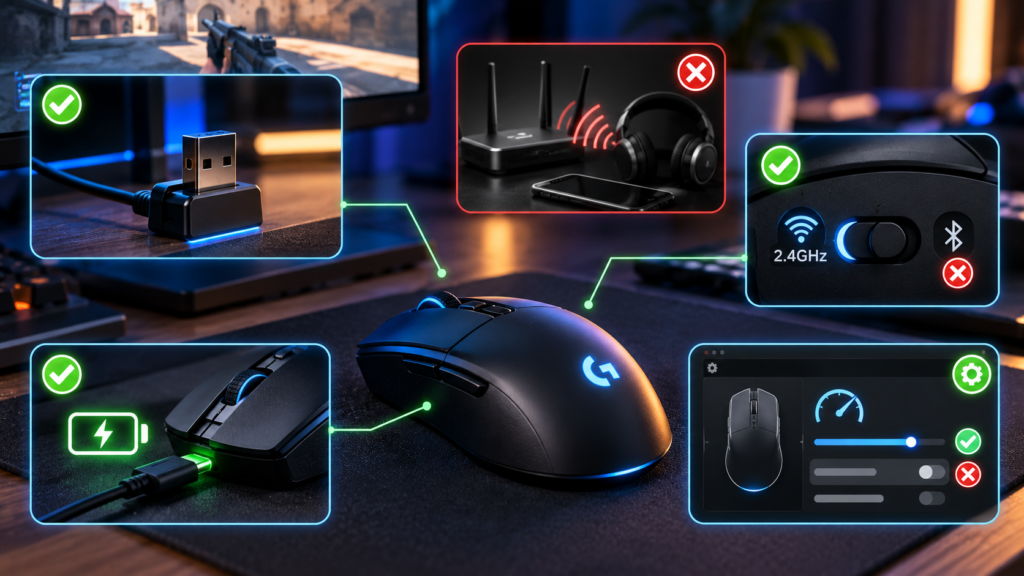
Keep the receiver close. Plug it into a front USB port, or use the extension adapter that comes with many gaming mice so the receiver sits on your desk, near the mouse. A receiver plugged into the back of a PC under a metal desk is asking for trouble.
Keep other wireless devices away from the receiver. Wi-Fi routers, wireless headsets and phones on the same desk can sometimes cause interference.
Don’t use Bluetooth mode for gaming. Many mice support both. Make sure you’re on the 2.4GHz receiver.
Charge before it dies. Some mice reduce performance or enter power-saving modes when the battery gets very low.
Turn off power saving in the mouse software. Some brands include “battery saver” or low-power modes that lower the polling rate.
So Which Should You Buy?
Buy wired if: your budget is tight, you never want to think about charging, or you just want the best sensor for the money.
Buy wireless if: you can spend a bit more, you hate cable drag, or you want a cleaner desk. A good 2.4GHz gaming mouse won’t hold you back, even in competitive games.
Avoid: cheap no-name wireless mice for gaming, and Bluetooth for any game where reaction time matters.
FAQs
Do wireless gaming mice have input lag?
Good gaming wireless mice using a 2.4GHz receiver have input lag so close to wired mice that you won’t feel the difference. Cheap office wireless mice and Bluetooth connections are slower.
Do pro players use wireless mice?
Yes. Wireless mice are now very common in professional CS2 and Valorant, which shows how close the performance has become.
Is Bluetooth good for gaming?
No. Bluetooth adds more delay and is less consistent. Use it for work or travel, and switch to the USB receiver or a cable for games.
What polling rate should I use?
1000Hz is the standard for gaming and a safe choice. Higher rates like 4000Hz can feel smoother on high refresh rate monitors, but they use more CPU and battery.
Is a wired mouse better on a budget?
Usually, yes. Under ₹2,000, a wired gaming mouse from a known brand generally beats a wireless mouse at the same price.
If you’re shopping on a budget, see our picks for the best gaming mouse under ₹1,500. And if your mouse feels fine but your whole game still feels delayed, our guide to reducing input lag on Windows 10/11 covers the system side.