
How to Avoid CS2 Skin Scams: Fake Trade Offers, API Scams and Phishing Sites
Every CS2 player eventually gets the message. A stranger adds you on Steam and says, “Hey bro, can you vote for my team in this tournament?” They send a link. It looks exactly like the Steam login page.
It isn’t. Ten minutes later, your inventory is gone.
CS2 skins are worth real money, so scammers put real effort into stealing them. The good news is that almost every scam relies on the same handful of tricks. Learn them once and you’ll spot them for life.
The Red Flags at a Glance
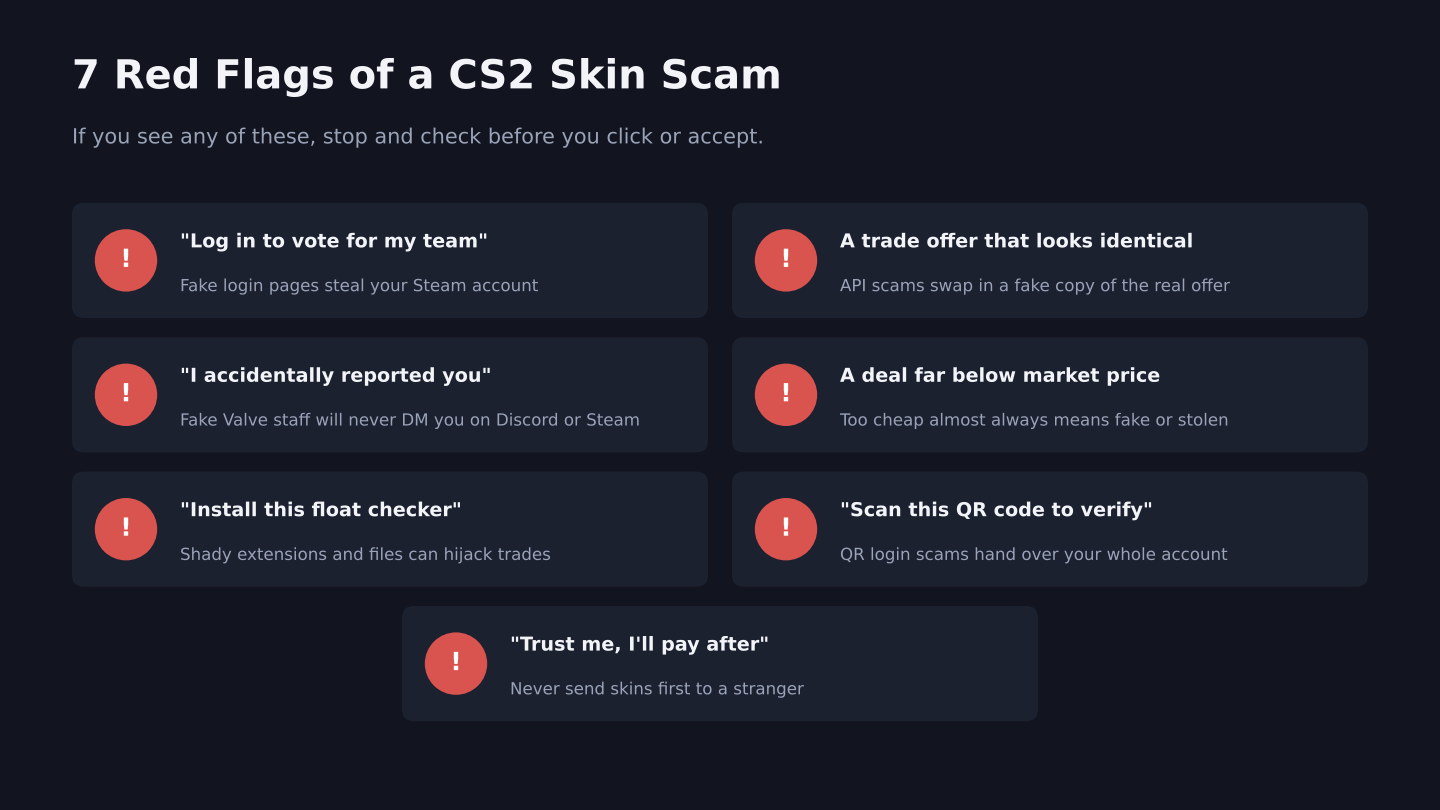
Seven common warning signs of CS2 skin scams (file: cs2-skin-scam-red-flags.png)
1. Phishing Sites (Fake Steam Login Pages)
This is the most common scam. A scammer sends you a link to a site that looks like Steam, a tournament page or a skin giveaway. When you “sign in,” you’re actually typing your username, password and Steam Guard code into their site.
Common lines they use:
- “Vote for my team, we need one more vote”
- “You won a free knife, claim it here”
- “Check out my new skin trading site”
- “Is this you in this screenshot?”
How to stay safe: Never log in through a link someone sends you. Check the address bar. Real Steam pages are on steamcommunity.com or store.steampowered.com. When a site asks you to “Sign in through Steam,” look carefully at the URL of the login window before typing anything. Fake sites often use a lookalike address with one wrong letter.
2. API Key Scams
This one is sneaky. If a scammer gets access to your account even briefly, or tricks you into logging into a fake site, they can create a Steam Web API key on your account. That key lets them watch your trade offers.
Then they wait. When you start a real trade on a marketplace, they instantly cancel it and send you an identical-looking offer from a fake account with the same name and avatar. You accept, thinking it’s the real trade, and your skins go straight to the scammer.
How to stay safe:
- Visit steamcommunity.com/dev/apikey while logged in.
- If there’s a key there that you didn’t create, revoke it right away.
- Change your password and sign out of all other devices.
- Before accepting any trade offer, check the other account’s Steam level, join date and profile, not just the name and avatar.
3. Fake Valve Staff and “Accidental Reports”
The message usually goes like this: “Sorry, I accidentally reported your account. Contact this Valve admin to fix it.” The “admin” is the scammer’s friend, who asks you to verify your inventory by sending it to them or logging into a site.
How to stay safe: Valve employees will never message you on Steam or Discord to fix a ban or report. Anyone who claims to be Valve support in a DM is lying. Block and move on.
4. QR Code Login Scams
The scammer asks you to scan a QR code with your Steam mobile app to “verify your account” or “join the tournament.” That QR code is actually a real Steam login request for their device. Scan it, and you’ve just logged them into your account.
How to stay safe: Only scan a Steam QR code when you’re logging in on your own PC and you started the login yourself.
5. Fake Deals and Middlemen
A knife listed at half the market price. A trader who wants you to send your skin first and promises to pay right after. A “trusted middleman” who turns out to be the scammer’s second account.
How to stay safe: If a price looks too good to be true, it is. Never send skins first to someone you don’t know. Use well-known marketplaces that hold the money until the trade completes, and never use a middleman suggested by the person you’re trading with.
6. Fake Tools, Extensions and Files
“Download this float checker.” “Run this skin price tool.” “Open this file to see the trade details.” These downloads can steal your login session, swap trade offers or take over your browser.
How to stay safe: Only install well-known tools from their official sources. Never run a file a stranger sends you, especially .exe or .scr files.
7. Trade Reversal Scams
Since July 2025, Steam has a feature called Trade Protection for CS2. Items you receive in a trade are protected for 7 days. During that time, the account that sent them can reverse every protected trade from the last 7 days. It was added to help hacked players get their items back, and it works.
But scammers found a way to abuse it. A scammer sells you a skin, gets paid outside Steam, then reverses the trade a few days later. You lose the skin and the money.
How to stay safe: Don’t pay someone directly outside a marketplace for skins. Use marketplaces that have rules for trade protected items and hold the seller’s payment until the protection period ends. Items you receive will show a trade protected marker until the 7 days pass.
How to Lock Down Your Steam Account
| Setting | Why It Matters |
| Steam Guard Mobile Authenticator | Every trade needs your phone to confirm |
| Unique, strong password | One leaked password shouldn’t unlock everything |
| Check your API key regularly | Catches API scams before they hit |
| Don’t share your Steam Guard codes | No real service ever needs them |
| Check confirmations in the Steam app | See exactly which items and which account before confirming |
The last one is huge. When you confirm a trade in the Steam mobile app, it shows the items and the account you’re trading with. Read it every time. It’s the last chance to catch a fake offer.
What to Do If You Got Scammed
Move fast, because the 7 day trade protection window matters.
- Change your Steam password right away.
- Sign out of all other devices in your Steam Guard settings.
- Revoke any API key you didn’t create.
- Check your trade history. If your items were taken in a trade protected trade within the last 7 days, you may be able to reverse it from your trade history. Reversing undoes all of your protected trades from that period, and your account gets a 30 day trade cooldown.
- Contact Steam Support through the official Steam help site.
- Report the scammer’s account on Steam.
Do this as soon as possible. After 7 days, protected trades can no longer be reversed.
FAQs
What is the most common CS2 skin scam?
Phishing links that send you to a fake Steam login page, usually disguised as a tournament vote, giveaway or trading site.
What is a Steam API scam?
A scammer creates an API key on your account and uses it to cancel your real trade offers and replace them with fake copies that send your skins to them.
Can I get scammed skins back in CS2?
Sometimes. If the trade was trade protected and is less than 7 days old, you may be able to reverse it from your trade history. Otherwise, contact Steam Support.
Will Valve ever message me about my account?
No. Valve doesn’t contact players through Steam chat or Discord about bans, reports or verification.
Is it safe to use skin trading sites?
Well-known sites with a long track record are generally safer than trading with strangers. Check our comparison of top CS2 marketplaces before choosing one.
Selling skins soon? Read our guide on how to sell skins for real money safely, and check the hidden trading fees before you list anything.


